User Guide
User Guide
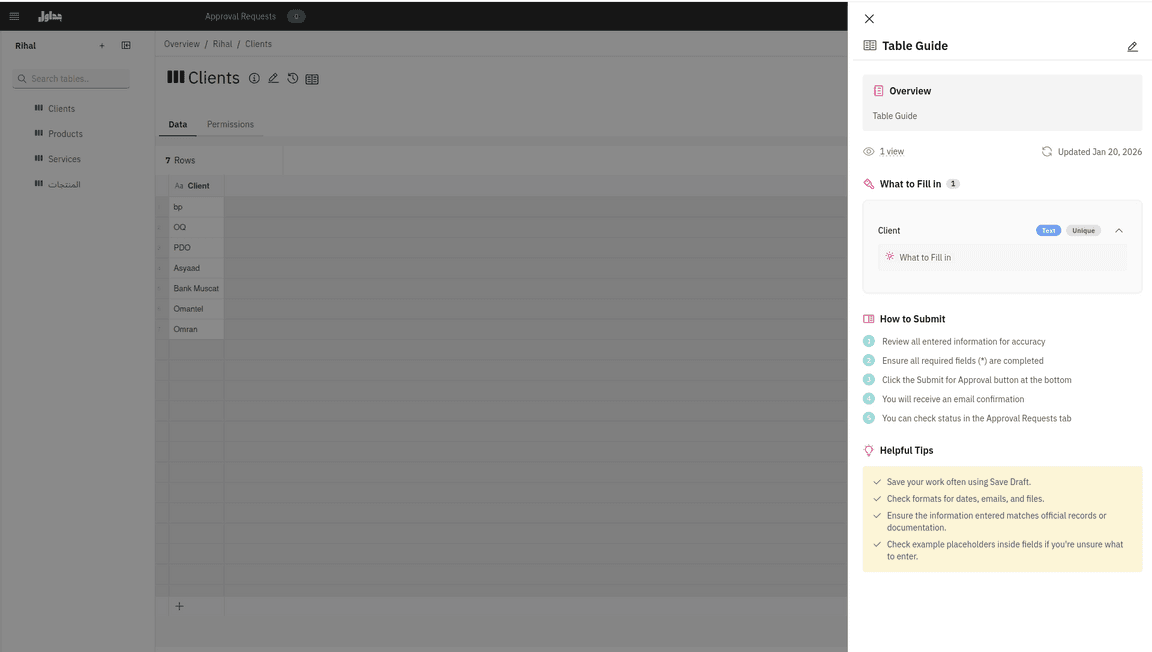
The User Guide is a powerful built-in feature in Jadawel designed to support efficient and accurate data entry by providing clear guidance directly within the table interface. It offers detailed descriptions, helpful tips, examples, and clear instructions on how to correctly complete and submit data.
This feature ensures that users have all the information they need at their fingertips, reducing errors and confusion while maintaining consistent data entry practices across your organization.
Overview
The User Guide feature serves two primary audiences:
- Admins: Create and manage comprehensive guides to standardize data entry practices
- Data Entry Users: Access clear instructions and examples while entering data
For Administrators
Administrators can create and manage the User Guide through the admin panel. This powerful capability allows you to:
Creating and Configuring User Guides
Define Column Descriptions: Provide detailed explanations for each column in your table, helping users understand exactly what data should be entered.
Add Explanatory Text: Include helpful tips, best practices, and contextual information to guide users through the data entry process.
Specify Formatting Requirements: Clearly define any formatting rules, validation requirements, or data constraints that users must follow.
Provide Examples: Include practical examples that demonstrate correct data entry, making it easier for users to understand expectations.
Add Step-by-Step Instructions: Create clear submission guidance that walks users through the entire data entry process from start to finish.
Benefits for Administrators
- Standardize Data Entry: Ensure all users follow the same procedures and guidelines
- Minimize Errors: Reduce data entry mistakes by providing clear instructions upfront
- Reduce Training Time: New users can refer to the guide instead of requiring extensive training
- Track Adoption: Monitor which users have viewed the guide to ensure compliance
- Maintain Quality: Ensure data quality and consistency across your organization
For Data Entry Users
Data entry users can access the User Guide directly from the table view while entering data into the grid. This seamless integration ensures that guidance is always available when needed.
Accessing the User Guide
Users can access the guide without leaving the data entry page, allowing them to:
- View Column Explanations: Understand what data should be entered in each field
- See Practical Examples: Review examples of correctly formatted data
- Follow Submission Instructions: Get step-by-step guidance on completing and submitting data
- Refer to Best Practices: Access tips and recommendations for efficient data entry
Benefits for Data Entry Users
- Confident Data Entry: Enter data correctly the first time with clear guidance
- No External Documentation: All instructions are available within the application
- Reduced Confusion: Get immediate answers to common questions
- Improved Efficiency: Spend less time figuring out requirements and more time entering data
Best Practices
To make the most of the User Guide feature:
- Keep It Updated: Regular update the guide to reflect any changes in requirements or processes
- Be Clear and Concise: Use simple language and avoid unnecessary jargon
- Include Visual Examples: Where possible, provide screenshots or sample data
- Organize Logically: Structure the guide in a way that follows the natural data entry flow
- Solicit Feedback: Ask users for input on how to improve the guide
- Monitor Usage: Track who has viewed the guide to identify users who may need additional support
User Guide Tracking
Administrators can monitor guide adoption by tracking which users have viewed the User Guide. This information helps:
- Identify users who may need additional training or support
- Ensure all team members have reviewed important instructions
- Measure the effectiveness of the guide
- Maintain compliance with data entry standards